 Deutsch (Deutschland)


Display Textures are wrong
- Sewoldt
-
 Autor
Autor
- Offline
- Benutzer
-

- Beiträge: 3
- Thanks: 1
Display Textures are wrong
3 Monate 5 Stunden her
This is an excellent add on . I'm surprised for such a detailed and well documented model for a freeware.
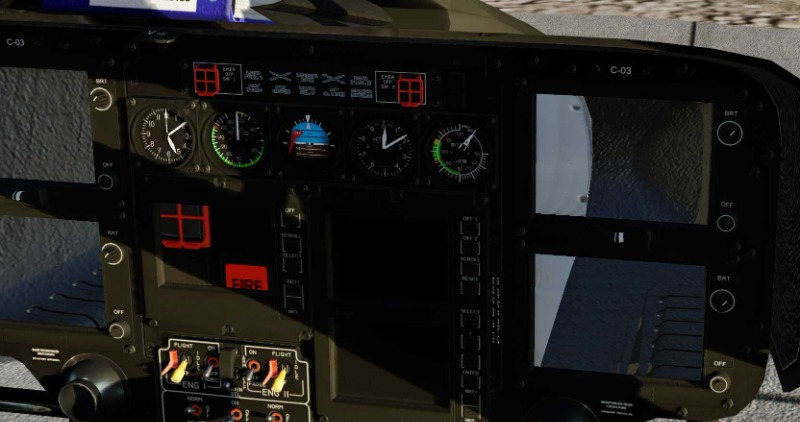
I recently freshly installed v ersion 5.35 (last installed was so old it crashed the sim when loading). Not it loads ok, but my displays (CAD, CPDS, VEMD) are either blank, or displaying a wrong texture (part of a fire test push button and a fire sign, couldn't attach a screenshot because of the 100 kb limitation). The rest of the display is visible, but has some unintended transparencies (I can't see the exterior through them). I've searched the web and forum and couldn't find anything about this.
My XP version is 12.4.3-r2.
Thanks.
I recently freshly installed v ersion 5.35 (last installed was so old it crashed the sim when loading). Not it loads ok, but my displays (CAD, CPDS, VEMD) are either blank, or displaying a wrong texture (part of a fire test push button and a fire sign, couldn't attach a screenshot because of the 100 kb limitation). The rest of the display is visible, but has some unintended transparencies (I can't see the exterior through them). I've searched the web and forum and couldn't find anything about this.
My XP version is 12.4.3-r2.
Thanks.
Bitte Anmelden oder Registrieren um der Konversation beizutreten.
- rotorsim
-
- Offline
- Administrator
-

- Beiträge: 281
- Thanks: 62
Re: Display Textures are wrong
2 Monate 3 Wochen her
Please load up the log file (log.txt in X-Plane's main folder) of the respective flight.
Bitte Anmelden oder Registrieren um der Konversation beizutreten.
- Sewoldt
-
Autor
- Offline
- Benutzer
-
- Beiträge: 3
- Thanks: 1
Re: Display Textures are wrong
2 Monate 3 Wochen her
Thanks, I'm uploading the logs and a compressed screenshot.
Bitte Anmelden oder Registrieren um der Konversation beizutreten.
- rotorsim
-
- Offline
- Administrator
-
- Beiträge: 281
- Thanks: 62
Re: Display Textures are wrong
2 Monate 3 Wochen her
I suspect that one or more files are corrupted.
Download the package again and reinstall the helicopter. Be sure to delete the existing folder first.
One more thing: Normally, X-Plane does not expect an aircraft package folder to be located directly in the "aircraft" folder, but rather in a subfolder within it.
Download the package again and reinstall the helicopter. Be sure to delete the existing folder first.
One more thing: Normally, X-Plane does not expect an aircraft package folder to be located directly in the "aircraft" folder, but rather in a subfolder within it.
Bitte Anmelden oder Registrieren um der Konversation beizutreten.
- Sewoldt
-
Autor
- Offline
- Benutzer
-
- Beiträge: 3
- Thanks: 1
Re: Display Textures are wrong
2 Monate 3 Wochen her
Thanks for your help. I reinstalled a fresh download and created a subfolder a suggested, but it stayed the same. Finally I solved the issue: I have a Realsimgear GTN650 connected as a 2nd monitor. It was turned off as I was using the panel GPS, but it still appeared in Xplane as a 2nd 2D panel display. I turned it off 'Unused' and everything in the Helo started working. Now I can finally fly it as intended. Thanks a lot.
Folgende Benutzer bedankten sich: rotorsim
Bitte Anmelden oder Registrieren um der Konversation beizutreten.
- rotorsim
-
- Offline
- Administrator
-
- Beiträge: 281
- Thanks: 62
Re: Display Textures are wrong
2 Monate 3 Wochen her
Thanks for the feedback. It is fascinating to see the variety of things that exist.
Good to know! This might help others facing a similar problem, too.
Good to know! This might help others facing a similar problem, too.
Bitte Anmelden oder Registrieren um der Konversation beizutreten.
Ladezeit der Seite: 0.368 Sekunden